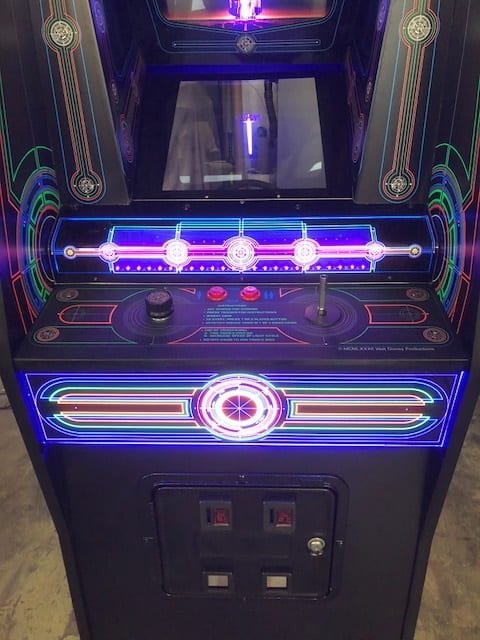
If you ever stepped into an arcade in the early '80s, the hypnotic glow of a Tron cabinet probably seized your attention. That digital world of Light Cycles, tanks, and the menacing MCP wasn't just a game; it was an experience, a revolutionary tie-in that, for many, outshone the movie itself. Fast forward decades, and the desire to re-enter the mainframe and challenge the system remains strong. But how do you bridge the gap between vintage coin-op cabinets and modern living rooms? That's where emulation and modern ways to play Tron Arcade come in, offering a gateway back to the Grid without needing a time machine or a stack of quarters.
This isn't about mere nostalgia; it's about preserving a piece of gaming history and making it accessible. Whether you're a seasoned player yearning for the authentic feel of a rotary dial or a newcomer curious about this iconic title, modern technology offers robust, often stunningly accurate, avenues to relive the digital battles of Bally Midway's 1982 masterpiece.
At a Glance: Your Modern Tron Arcade Journey
- Emulation is King: MAME (Multiple Arcade Machine Emulator) is the gold standard for accurately reproducing the
Tronarcade experience. - Controls Matter: The unique 8-way joystick, single button, and crucial rotary dial are key to authentic play. Modern controllers can replicate this.
- Beyond Emulators: Dedicated mini-cabinets, Raspberry Pi setups, and even official re-releases offer varying degrees of authenticity and convenience.
- Legal & Ethical Nuances: Understand the complexities of ROMs and intellectual property when seeking game files.
- The Subgames Still Shine: Master the Light Cycles, Battle Tanks, I/O Tower, and MCP Cone just like in 1982, now in high definition.
Stepping Back into the System: Why Tron Arcade Still Captivates
The original Tron arcade game, released by Bally Midway in 1982, wasn't just a licensed cash-in; it was a technological marvel that pushed boundaries. Inspired by the groundbreaking Walt Disney Productions film, the game took players deep into a digital universe, featuring iconic elements like the sleek Light Cycles, the formidable battle tanks, and the towering Input/Output Tower. It's a testament to its quality that the arcade game actually earned more than the film's initial theatrical release, solidifying its place in gaming lore.
From its distinct cabinet designs (standard upright, mini upright, and cocktail table) to its innovative control scheme – an 8-way joystick for movement, a single button for firing or speed, and a precise rotary dial for aiming – Tron offered a singular experience. You, as Tron, navigated four distinct subgames, each progressing through 12 increasingly difficult levels named after programming languages like "BASIC," "FORTRAN," and "ASSEMBLY." To truly explore the Tron arcade game, you need to understand these interwoven challenges. Completing all four subgames within a level was the only way to advance, creating a thrilling gauntlet of digital skill.
This blend of innovative gameplay, iconic visuals, and a compelling sci-fi narrative is why Tron remains a beloved classic. And it’s precisely why the quest for modern ways to play it is so persistent.
The Digital Resurrector: Understanding Emulation
At its heart, emulation is the process of making one computer system behave like another. For arcade games like Tron, this means software (an "emulator") mimics the original arcade machine's hardware, allowing you to run the game's original software (the "ROM") on your PC, Mac, or even a tiny Raspberry Pi. It's a sophisticated act of digital archaeology, meticulously recreating every nuance of the game's original environment.
MAME: The Gold Standard for Arcade Accuracy
When it comes to arcade game preservation and playback, one name stands above all others: MAME (Multiple Arcade Machine Emulator). Since its inception, MAME's mission has been to preserve arcade history, ensuring these fleeting pieces of digital art are never lost. For Tron, MAME offers an unparalleled level of accuracy, replicating the game's unique graphics, sound, and especially its control scheme with impressive fidelity. It's not just running the game; it's running the game as if it were on the original Bally Midway board.
The ROM & BIOS Conundrum: A Quick Clarification
To play Tron (or any game) on MAME, you need two primary components:
- The Emulator: MAME itself, which you can freely download.
- The ROM (Read-Only Memory) file: This is the digital copy of the game's software, extracted directly from the original arcade machine's circuit boards. Think of it as the game cartridge or disc for a console, but for an arcade machine.
Unlike some console emulators that require a separate BIOS file (a basic input/output system), MAME often incorporates the necessary BIOS files for arcade systems directly or uses them as separate but related ROM sets. ForTron, you'll be looking for thetronROM set.
Getting Started with MAME: Your First Journey into the Grid
Setting up MAME to play Tron isn't overly complex, but it does require a few deliberate steps.
1. Acquiring MAME
The official MAME website is your first stop. You'll find versions for Windows, macOS, and Linux. Choose the appropriate installer for your system. MAME comes in two main flavors: a command-line version (mame.exe) for power users and GUI versions (like MAMEUI for Windows or QMC2 for cross-platform) that offer a more user-friendly graphical interface. If you're new to emulation, a GUI version is highly recommended.
2. The Delicate Dance of ROM Acquisition
This is where the conversation around legality and ethics often arises. ROMs are digital copies of copyrighted software. While emulators themselves are legal, distributing or downloading ROMs for games you don't own (or no longer have access to the original hardware for) can exist in a legal grey area. Many retro enthusiasts operate under the philosophy that if a game is no longer commercially available, it falls into a preservation category.
- Where to Find ROMs: While we cannot link directly, a simple search for "MAME Tron ROM" will lead you to various archiving sites. You'll typically download a
.zipfile (e.g.,tron.zip). Crucially, do NOT extract this zip file. MAME expects the ROMs to remain in their compressed.zipformat.
3. Setting Up Your MAME Environment
Once MAME is installed:
- Locate the
romsfolder: Inside your MAME installation directory, there will be a folder usually namedroms. This is where all your game.zipfiles go. - Place
tron.zip: Drag and drop yourtron.zipfile directly into thisromsfolder. - Launch MAME: Open your MAME GUI (e.g., MAMEUI). It will likely scan your
romsfolder. You should seeTronappear in your game list.
4. Firing Up Tron (and Credits)
Select Tron from the list and launch it. The game will boot up, often showing the original arcade boot sequence. To "insert coins" (add credits), press the "5" key on your keyboard. To start a 1-player game, press "1". For a 2-player alternating game, press "2".
The Heart of the Machine: Configuring Controls for Tron
Tron's controls are unique, and getting them right is paramount for an authentic experience. MAME's robust input mapping system allows for incredible flexibility.
The Core Trinity: Joystick, Button, Dial
- 8-Way Joystick (Movement): This is straightforward. In MAME, once the game is running, press
Tabto bring up the MAME OSD (On-Screen Display) menu. Navigate to "Input (this Game)." Here, you can map "Joystick Up," "Down," "Left," and "Right" to your gamepad's analog stick or D-pad, or your arcade stick. - Fire/Speed Button: This is also simple. Map "Button 1" to an easily accessible button on your controller.
- The Rotary Dial (Aiming/Steering): This is the game-changer. The original
Troncabinet featured a physical rotary dial, which provided analog precision for directing Tron's disc, tank turret, or Light Cycle steering.
- Mouse as a Stand-in: For most players, using a mouse is the easiest way to replicate the rotary dial. In the MAME "Input (this Game)" menu, look for "Analog Controls" or specific
Tronentries like "Dial." You can map "Dial Analog" to your mouse's horizontal or vertical movement. Experiment to see which feels more natural. You'll also want to adjust the "Dial Sensitivity" (often found in "Analog Controls" or "Input (general)" for fine-tuning). - Dedicated Rotary Controllers: For the truly hardcore, specific arcade peripherals like the Ultimarc Spintrak or custom rotary encoders offer the most authentic feel. These connect via USB and are detected by MAME as analog inputs, providing a perfect 1:1 feel. Mapping them is similar to the mouse: assign the physical rotary input to the "Dial Analog" setting.
Pro Tip: Take the time to fine-tune the rotary dial sensitivity. It makes a massive difference in how responsive and enjoyable the game feels, particularly in the Light Cycles subgame.
Beyond MAME: Other Emulation Avenues & Platforms
While MAME is the gold standard, other options exist, each with its own advantages.
RetroArch: The Universal Front-End
RetroArch isn't an emulator itself, but a powerful front-end that runs various "cores" (which are the actual emulators). It offers a unified interface, shaders (to mimic CRT scanlines), and advanced features like rewind. For Tron, you'd typically use a MAME core within RetroArch. It's fantastic for consolidating your entire retro gaming library.
Raspberry Pi and RetroPie: Your Mini Arcade
Imagine a dedicated Tron mini-cabinet powered by a credit-card-sized computer. That's the magic of a Raspberry Pi running RetroPie. RetroPie is an operating system built on top of Linux that includes EmulationStation (a front-end) and various emulator cores (including MAME).
- Setup: Flash RetroPie to an SD card, configure your controls, load your ROMs, and connect it to a TV.
- Benefits: Cost-effective, compact, and can be integrated into custom arcade builds. Many enthusiasts create dedicated
Tronarcade control panels with actual joysticks and rotary dials for this setup. Building a dedicated Tron arcade setup can be a rewarding project.
Web-Based Emulators: Instant Gratification
A growing number of websites now offer in-browser emulation, allowing you to play Tron instantly without downloading any software. While incredibly convenient, these often lack the accuracy and control customization of a dedicated MAME installation. They're great for a quick fix but not for serious play.
Mastering the Grid: A Deep Dive into Tron's Subgames
Understanding how to play Tron means understanding its four distinct challenges, each with its own strategies and control nuances.
1. I/O Tower
- Objective: Destroy Grid Bugs with Tron's disc and clear a path to a flashing circle, which you must enter before a timer expires.
- Controls: Joystick for movement, button for throwing disc, rotary dial to aim disc.
- Strategy: Prioritize clearing a path. Don't waste time on every bug unless necessary. Picking up a "Bit" (a flashing square) grants a 5000-point bonus, often worth a detour if safe.
2. MCP Cone
- Objective: Destroy a multicolored wall in front of the MCP cone and enter it.
- Controls: Joystick for movement, button for firing.
- Strategy: Methodically blast away the wall blocks. Completing the level awards 1000 points, with an additional 1000 for destroying all wall blocks. This subgame emphasizes precision and timing with your shots.
3. Battle Tanks
- Objective: Guide Tron's red tank through a maze to destroy computer-controlled blue tanks or red recognizers, avoiding enemy hits.
- Controls: Joystick for movement, rotary dial to aim tank turret, button to fire.
- Strategy: Be mindful of your surroundings. The central purple diamond warps your tank to a random maze area, useful for escape or surprise attacks. At higher levels, fast-moving "Recognizers" replace tanks, requiring three shots to destroy and relentless evasion. There's a known bug: your tank is immune to enemy fire if not touching white corridor lines, though it can still be rammed. Strategic use of the rotary dial for aiming while moving is crucial here. The Battle Tanks subgame is arguably where precise rotary control shines most.
4. Light Cycles
- Objective: Guide a blue Light Cycle in an arena, avoiding walls and light trails left by both your cycle and your opponent, maneuvering to force opponents into walls.
- Controls: Joystick for movement (forward, turn), rotary dial for fine-tuned steering.
- Strategy: This is a game of spatial awareness and prediction. Each level's enemy cycles have fixed behavior patterns, meaning once you discover their "trick," you can consistently defeat them. The rotary dial allows for sharp, precise turns to box in opponents. Quick reflexes are key to surviving in this classic segment.
Each of the 12 difficulty levels (RPG, COBOL, BASIC, FORTRAN, SNOBOL, PL1, PASCAL, ALGOL, ASSEMBLY, OS, JCL, and USER) ramps up the challenge across all four subgames.
The Hardware Hunt: Controllers for an Authentic Tron Experience
While a standard gamepad can get you by, truly experiencing Tron as intended means investing in or building the right controller setup.
- Standard Gamepads: Functional but a compromise. Analog sticks can approximate the joystick, but the rotary dial is often relegated to a thumbstick or a shoulder button for incremental rotation, which lacks the original's fluidity.
- Arcade Sticks: A significant upgrade for the joystick and button. Many arcade sticks are modifiable, allowing you to swap out components. However, they still don't natively provide a rotary dial.
- Spinners/Rotary Controllers: This is the holy grail for
Tronand other rotary-controlled arcade games (likeTempestorArkanoid). Devices like the Ultimarc Spintrak or TurboTwist 2 are designed to replicate the feel of arcade rotary controls. They connect via USB and are plug-and-play with MAME. This single addition transforms theTronexperience. - Trackballs/Mice: As mentioned, a mouse can be a surprisingly effective stand-in for a rotary dial. Trackballs (like those found in
CentipedeorMarble Madnesscabinets) can also be used, though their feel is slightly different from a pure rotary dial. Many MAME users integrate a dedicated mouse alongside an arcade stick for games that require both.
Custom Arcade Control Panels: For the ultimate enthusiast, building a dedicated control panel that incorporates an 8-way joystick, a fire button, and a genuine rotary dial (or spinner) is the pinnacle. Paired with a Raspberry Pi running RetroPie, this creates an authentic, dedicatedTronmachine without the footprint or maintenance of a full arcade cabinet.
Common Pitfalls and How to Avoid Them
Even with the best tools, emulation can present a few hurdles.
- "ROM not found" or "Missing ROMs": This is the most common issue. Ensure your
tron.zipfile is exactly in theromsfolder and that it's the correct MAME version for your emulator (MAME updates frequently, and ROM sets are sometimes tied to specific MAME versions). Do not unzip the ROM file. - Control Configuration Headaches: Take your time in MAME's "Input (this Game)" menu. Save your configurations. If a specific controller isn't working, check your operating system's device manager to ensure it's detected correctly.
- Performance Issues:
Tronisn't a graphically intensive game by modern standards, but older or underpowered systems might struggle with MAME's accuracy-focused emulation. Ensure your graphics drivers are up to date and close unnecessary background applications. - Audio/Video Sync Problems: Less common with
Tron, but if you experience stuttering audio or video, check MAME's video and audio settings. Sometimes switching video drivers (e.g., fromd3dtoopenglor vice-versa) can resolve issues. - Lack of Authentic Feel: This usually comes down to controller choice. If the game doesn't feel right, reassess your input devices, especially the rotary dial. No amount of emulation accuracy can overcome a poor control scheme.
Your Next Sector: Diving Deeper into the Digital Frontier
Revisiting Tron via modern emulation methods isn't just about playing an old game; it's about connecting with a piece of cultural history and appreciating the ingenuity that went into its design. Whether you opt for a simple MAME setup on your PC, embrace the versatility of RetroArch, or embark on a custom arcade build with a Raspberry Pi, the Grid awaits your commands.
The unique blend of arcade, sci-fi/futuristic, shooter, and tank themes within Tron ensures there's something for every player. The satisfaction of mastering the Light Cycles' fixed patterns, strategically destroying the MCP Cone, or deftly navigating the Battle Tanks' mazes remains as potent today as it was in 1982. So, power up your emulator, calibrate your rotary dial, and prepare to go in. The system needs you.